← Shop
DEPTH
Front to Back Mixing for Ableton
£15
One-off payment. Download straight away, licence certificate included. Licence terms
DEPTH lets you mix in two directions at once: left to right, and front to back. Drag a dot and the track moves closer or further away, with level, tone, width, early reflections and reverb all moving together, the way distance works in a real room.
Two devices
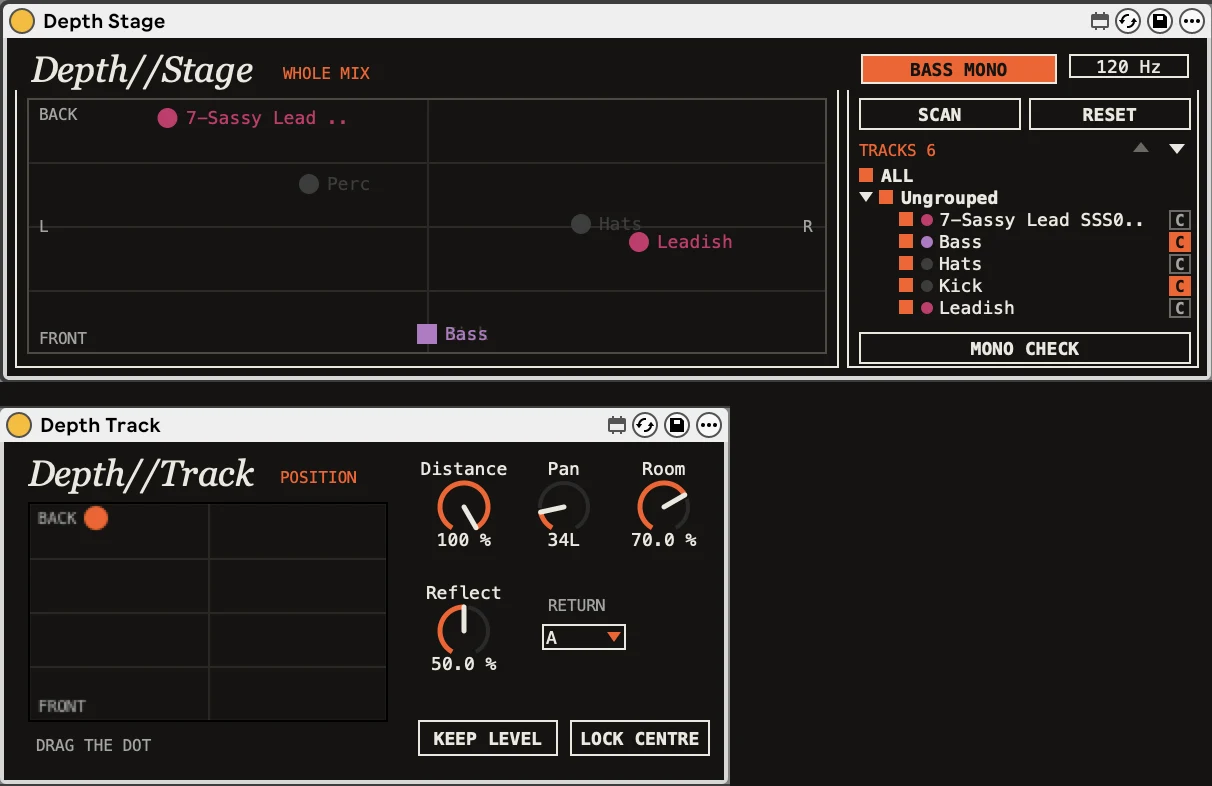
- Depth//Track goes on each track you want to place, with its own display to drag around
- Depth//Stage goes on your master and shows every track on one map, in its track colour, so you can lay out the whole mix at a glance and move anything with the mouse
Real distance cues
- Pushing a track back lowers its level by up to 6 dB, rolls off the top end so far-off parts sound darker, thins the low end and narrows the stereo image
- Early reflections blur the attack, and the track's send to a shared reverb return rises, so every element sits in the same room
- At the very front, the sound is left untouched
Built for big sessions
- The Stage lists every group and track. Show or hide them, fold groups away, and click a name to find its dot
- Lock Centre pins kick, bass and lead vocal to exact centre so they only move front to back
- Stereo Pan moves the whole stereo image inside the device, so wide pads and synths keep both sides as you pan them
- Keep Level lets you change depth without changing your balance
Master tools
- Bass Mono folds the low end to mono across the whole mix, from 40 to 400 Hz
- Mono Check folds everything to mono so you can check the mix holds up, with a clear warning while it's on
What you need
- Ableton Live 12 or later, Suite or Standard with Max for Live
- A return track with a reverb on it, which becomes the shared room
What's included
- Depth//Track v1.1 and Depth//Stage v1.0 (.amxd) and the user guide (PDF)
- Single user licence, made out to you, with every fix to v1 free