The Best Max for Live Devices in 2026, Sorted by What They Do
The best Max for Live devices are the ones that do a real job in your sessions, every week. So I've sorted this list by job: drums and rhythm, mixing and space, generative MIDI, utilities, and the best free picks.
To be upfront: I make two of the devices on this list, DRUM//GEN and DEPTH, and I sell them in my shop. Everything else here is made by Ableton or by other developers. I've only included devices you can check for yourself on Ableton's own site or in the Live manual, and I've tried to describe each one plainly.
What is Max for Live, and how do you install a device?
Max for Live lets you run devices built in Max, a visual programming tool, inside Ableton Live. It comes with Live Suite, and Live Standard owners can buy it as an add-on. Installing a device usually takes one drag.
What you need
You need Live Suite, or Live Standard with the Max for Live add-on. Without those, Live Intro and Standard can only run a few built-in devices, such as LFO and Expression Control. Each device also lists the version of Live it needs, so check that before you buy or download anything.
How to install a Max for Live device
- Download the device. It will be a single .amxd file, or an Ableton Pack ending in .alp.
- For a .amxd file, drag it from your downloads folder onto a track in Live. MIDI effects go on a MIDI track, before the instrument. Audio effects can go on any track.
- To keep it handy, drag it into your User Library in Live's Browser. It'll then show up there in every set.
- For a .alp Pack, double-click it, and Live will install it and add it to Packs in the Browser.
Drums and rhythm
For drums, the most useful Max for Live devices either write patterns for you or give you new sounds to play them with. These three cover both.
DRUM//GEN (mine)
DRUM//GEN is a drum pattern generator I built for my own studio. Pick a feel, hit Generate, and it writes a full 4-bar groove into a clip on your track, ready to play through your own Drum Rack. There are seven feels: 4x4, Garage, Breaks, Electro, Spacious, Beats and D&B, each with its own swing and velocity range.
It reads your Drum Rack's pad names and maps the kick, snare and hats for you. You can build Scene A, B and C as variations of one root, and fills land in their own clips. You can also drop a MIDI file onto it, or pick a clip in your set, and it'll grow variations from your own groove. It works in Session View and Arrangement View, and it needs Live 12.2 or later.
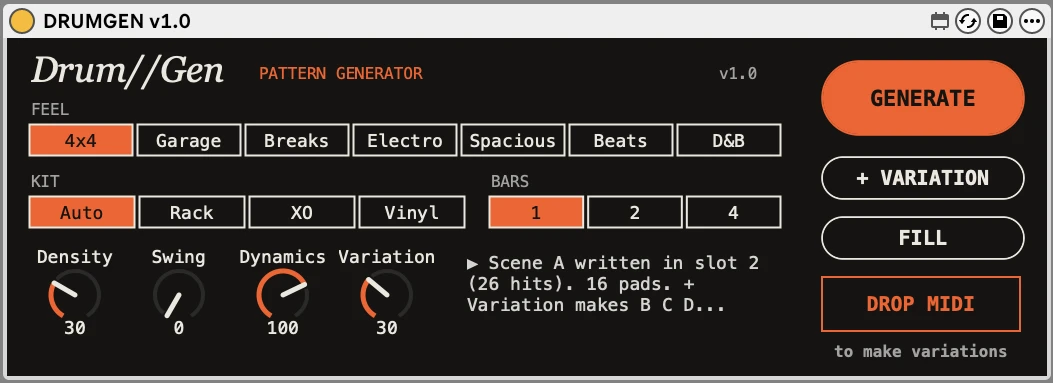
Best for: getting from an empty clip to a usable groove in seconds. See DRUM//GEN, the Max for Live drum pattern generator, in the shop. It's £15.
Patterns, from Generators by Iftah
Patterns is a drum pattern generator made by the producer Iftah and published by Ableton. It has a separate algorithm for each of six drum voices. You choose which drum each voice plays and which MIDI note it triggers, then generate voices one at a time. It's part of the Generators by Iftah pack, which is included with Live 12 Suite and needs Live 12.3 or later.
Best for: quick, playful drum ideas you can regenerate voice by voice.
The DS drum synths
The DS devices, such as DS Kick, DS Snare, DS Clap and DS HH, are small drum synths that come with Live Suite. Each one builds its sound from oscillators and noise instead of samples, so you can tune and shape every hit. They're documented in the Live 12 manual.
Best for: making your own drum sounds from scratch, with no sample hunting.
Mixing, space and depth
Most mixing tools work left to right, or on level and tone. These devices help with the third dimension: how near or far a sound feels, and what kind of room it's in.
DEPTH (mine)
DEPTH is a pair of devices I built for mixing front to back as well as left to right. Depth//Track goes on each track, and you drag a dot to move it closer or further away. Level, tone, width, early reflections and reverb send all move together, the way distance works in a real room.
Depth//Stage goes on your master and shows every track on one map, in its track colour, so you can lay out the whole mix at a glance. It also has Lock Centre for kick, bass and vocal, Keep Level, Bass Mono and a Mono Check. It needs Live 12 or later and a return track with a reverb on it.
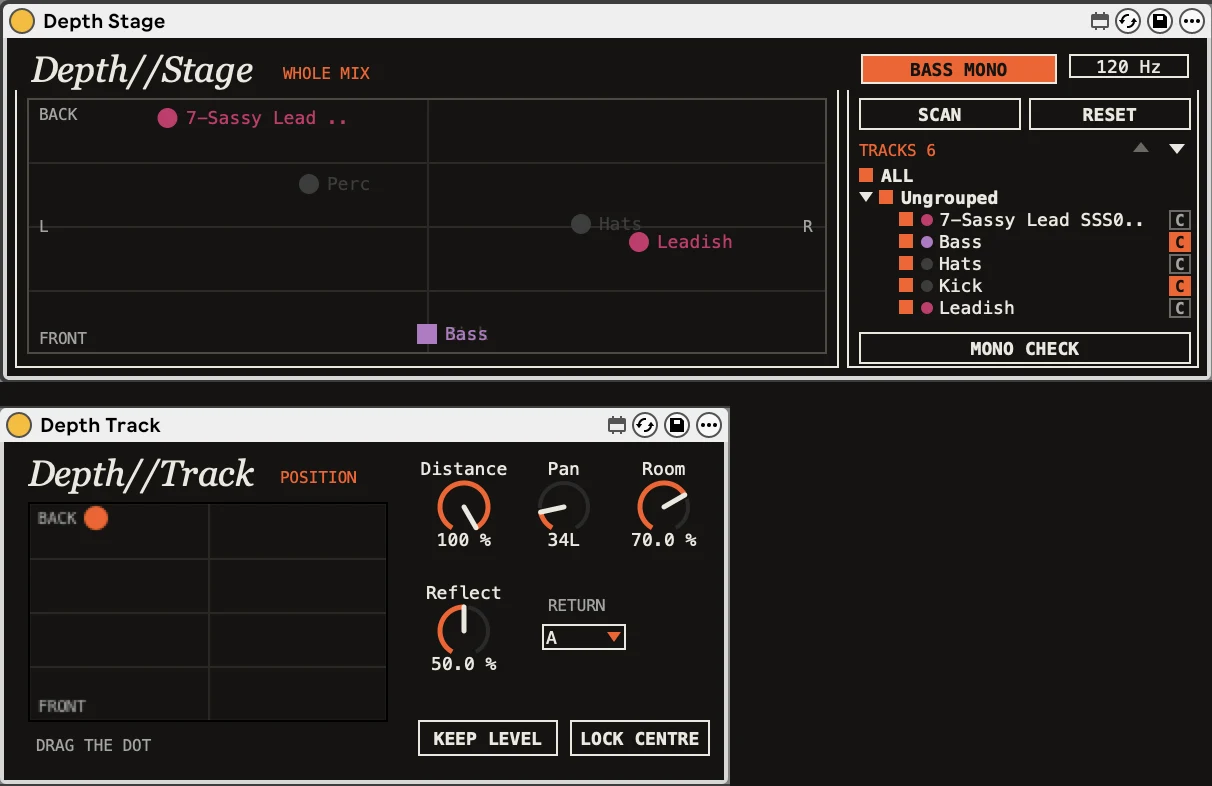
Best for: busy mixes where everything feels like it's fighting at the front. See DEPTH, the front to back mixing tool, in the shop. It's £15.
Convolution Reverb Pro
Ableton's Convolution Reverb pack uses impulse responses recorded from real spaces and hardware. The Pro version adds EQ, damping and modulation, and lets you combine two impulse responses, one for early reflections and one for the tail. It's included with Live 12 Suite.
Best for: putting sounds in a real-sounding room.
Re-Enveloper
Re-Enveloper splits a sound into three bands and compresses or expands each band's envelope, rather than its level. In practice, that means you can tame or bring out attacks and tails in one part of the spectrum. It's in Ableton's free Creative Extensions pack.
Best for: shaping how punchy or soft a sound is, band by band.
Spectral Blur
Also in Creative Extensions, Spectral Blur smears a chosen frequency range into a dense, reverb-like texture. A Freeze button holds the sound in place. It's more of a sound design tool than a plain reverb.
Best for: pads, washes and transitions.
Generative and MIDI devices
Generative devices write or bend notes for you, so you can react to ideas instead of starting from nothing. These are good places to start.
Patter
Patter by Adam Florin is a paid MIDI effect that builds rhythms and melodies from short segments of notes and rests. You set how many segments there are, how long they last and how much randomness each one adds. You can chain several copies for polyrhythms or call and response. It needs Live 11.1 or later.
Best for: rhythms and melodies you wouldn't have written by hand.
Sting
Sting, also by Iftah, generates 16-step acid basslines. Controls for type, root, rate, density, accent and gate shape what it writes. It comes in the same Generators by Iftah pack as Patterns.
Best for: acid lines and squelchy bass ideas in a couple of clicks.
Melodic Steps
Melodic Steps is a quick step sequencer for evolving melodies, polyrhythms and random patterns. It's another device from the free Creative Extensions pack.
Best for: melodies that keep changing over a long loop.
Bouncy Notes
Bouncy Notes, by Dillon Bastan, drops balls onto a piano roll, and they trigger notes where they land. It's part of the Inspired by Nature pack, which is included with Live 12 Suite.
Best for: playful, physics-driven patterns.
Granulator III
Granulator III is a granular instrument by Robert Henke, published by Ableton. It plays tiny slices of a sample, or of live audio, and has Classic, Loop and Cloud modes. With an MPE controller you can move pitch, grain position and grain size per note. It's included with Live 12 Suite.
Best for: textures, drones and pads built from any sound.
Utility devices worth knowing
Some of the most useful Max for Live devices already come with Live, and a few of them even run in Standard without the add-on. They don't make sounds. They move other things for you.
- LFO moves up to eight parameters with a low-frequency wave.
- Shaper does the same with an envelope you draw.
- Envelope Follower turns the level of a sound into movement, so a kick can duck or open another part.
- Expression Control maps MIDI and MPE sources, such as velocity or aftertouch, to any parameter.
- MIDI Monitor shows the MIDI and MPE data coming in, which helps when a controller misbehaves.
- Align Delay delays a signal by milliseconds, samples or distance, which is handy for lining up live mics.
The best free Max for Live devices
The best free place to start is Ableton's Creative Extensions pack. After that, the community library at maxforlive.com has plenty more to explore.
Creative Extensions
This free pack has eight devices: Melodic Steps, Pitch Hack, Gated Delay, Color Limiter, Re-Enveloper, Spectral Blur, and two synths, Bass and Poli. It needs Live 12 Standard with Max for Live, or Suite, where it's already included.
maxforlive.com
maxforlive.com calls itself the free library of Max for Live devices. Anyone can share devices there, so quality and support vary. Check the Live version and the comments before you rely on one in a project.
How to choose: CPU, Live version and Push support
Check three things before you add a device: which version of Live it needs, how much CPU it uses, and whether it works on Push if you use one.
Live version
Every device page should list the oldest version of Live it runs on. DRUM//GEN needs Live 12.2 or later, and DEPTH needs Live 12 or later. Older devices made for Live 10 or 11 often still work, but it's worth testing.
CPU
Max for Live devices run inside Live, so they share your computer's power. Granular instruments, convolution reverbs and devices with big animated displays tend to use the most. Keep an eye on Live's CPU meter, and freeze tracks you've finished with.
Push support
Ableton says most Max for Live devices from its Core Library and Packs work on Push in Standalone Mode, but third-party devices aren't guaranteed. Some have limits. For example, you can't load new samples, Melodic Steps is playback only, and the Inspired by Nature devices don't work in Standalone at all. Their Push compatibility article has the full list.
I built DRUM//GEN and DEPTH for Live on a computer, and DEPTH's Stage is designed for dragging with a mouse. If Push Standalone matters to you, get in touch before you buy and I'll tell you what I know.
Where to go next
If you've picked up DRUM//GEN, or you just want grooves to practise with, my guides to house drum patterns and UK garage drum patterns have step grids and free MIDI files to drop straight in. Both of my devices are in the Max for Live devices shop.
FAQs
Do I need Ableton Suite for Max for Live?
No, but it's the easiest way. Max for Live comes with Live Suite, and Live Standard owners can buy it as an add-on. Without either, you can only use a few built-in devices, such as LFO.
How do I install a device?
Drag the .amxd file onto a track in Live. To keep it for later, drag it into your User Library in the Browser too. If it comes as a .alp Pack, double-click it and Live will install it.
Are Max for Live devices free?
Some are and some aren't. Ableton's Creative Extensions pack is free, and many community devices on maxforlive.com are too. Others, including mine, are paid, usually as a one-off purchase.
Do they work on Push 3?
With Push connected to a computer, they work as they do in Live. In Standalone Mode, Ableton says most of its own devices work, with some limits, but third-party devices aren't guaranteed. Check Ableton's compatibility article, or ask the maker.
Do they use a lot of CPU?
It depends on the device. Simple MIDI and utility devices are usually light. Granular, convolution and heavily animated devices use more, so if your set starts to struggle, freeze or flatten tracks you've finished.